Last Updated on September 25, 2016
If you want a way to handwrite Chinese Characters by using a website and drawing them with your mouse, I believe that Google Translate’s Chinese handwriting tool is the best.
The reasons are numerous why you might want to use such a tool. If you encounter a new character that you have never seen before, or see a character for which you don’t know the character’s pronunciation, finding the character in a dictionary may be difficult. So drawing the character is the next best thing. Drawing any new character you encounter will help you remember the character better.
Here is how you use the tool:
First go to translate.google.com
Then under “Detect language”, choose Chinese.

After that, in the lower left corner of the leftmost translation box, you will see the character 拼. Next to that, if you hover over the down arrow, you will see a message that says “Select Input Tool”. From there, select the last option which is Chinese (Simplified, China) – Handwrite.
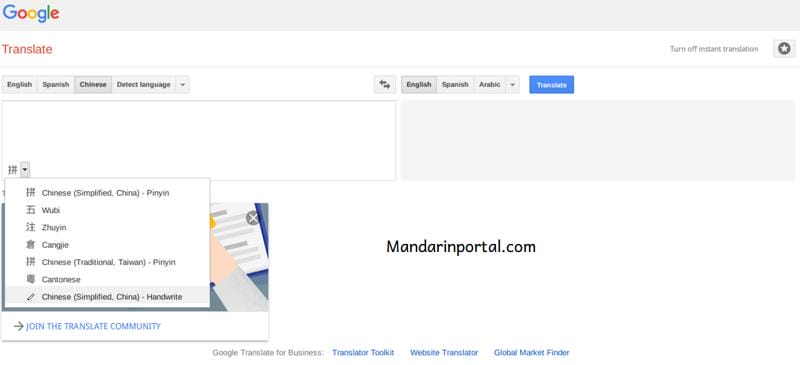
After that, you will see a writing box, and with your mouse you draw the character.

This tool appears to support writing both Simplified and Traditional Characters, which I think is very nice.
What did you think of this article? Let’s discuss this in the comments below.
🚀 Embark on an Epic Time-Travel Adventure with Watson! 🐕🦖🎨
Take a journey through time with Watson the Time-Travelling Dog: Dogs and Dinosaurs Adventure Coloring Book 1.
Join Watson and his dog brother Sherlock as they meet dinosaurs, make new friends, and embark on an unforgettable adventure! Perfect for kids, dog lovers, and coloring book enthusiasts alike.
Why you'll love it:
- Engaging, fun-filled story
- Beautiful illustrations to color
- Ideal for family fun or a thoughtful gift
Ready for an adventure that sparks creativity and fun? 📖 Grab your copy today and let the time-traveling excitement begin!
Get your book now 👇

Thank you so much, it now help me understand in chinese